How can I perform a factory reset of my camera in the NVR?
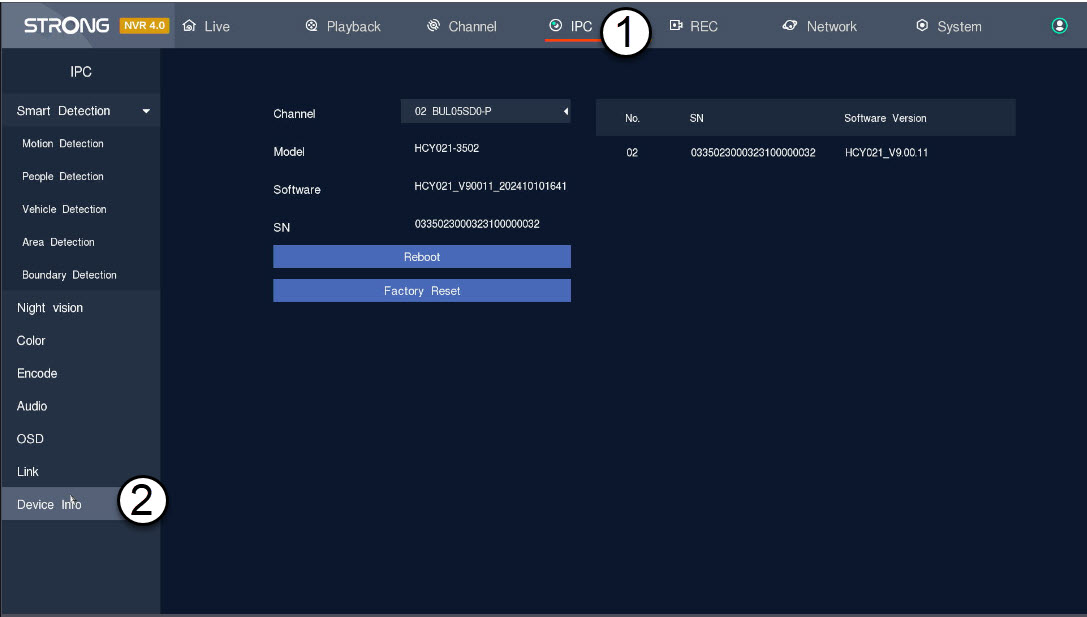


 English
 Български(Bulgarian)
 Hrvatski(Croatian)
 Čeština(Czech)
 Dansk(Danish)
 Nederlands(Dutch)
 Suomi(Finnish)
 Français(French)
 Deutsch(German)
 Magyar(Hungarian)
 Italiano(Italian)
 Norsk bokmål(Norwegian Bokmål)
 Polski(Polish)
 Português(Portuguese (Portugal))
 Română(Romanian)
 српски(Serbian)
 Slovenčina(Slovak)
 Slovenščina(Slovenian)
 Español(Spanish)
 Svenska(Swedish)
 Українська(Ukrainian)