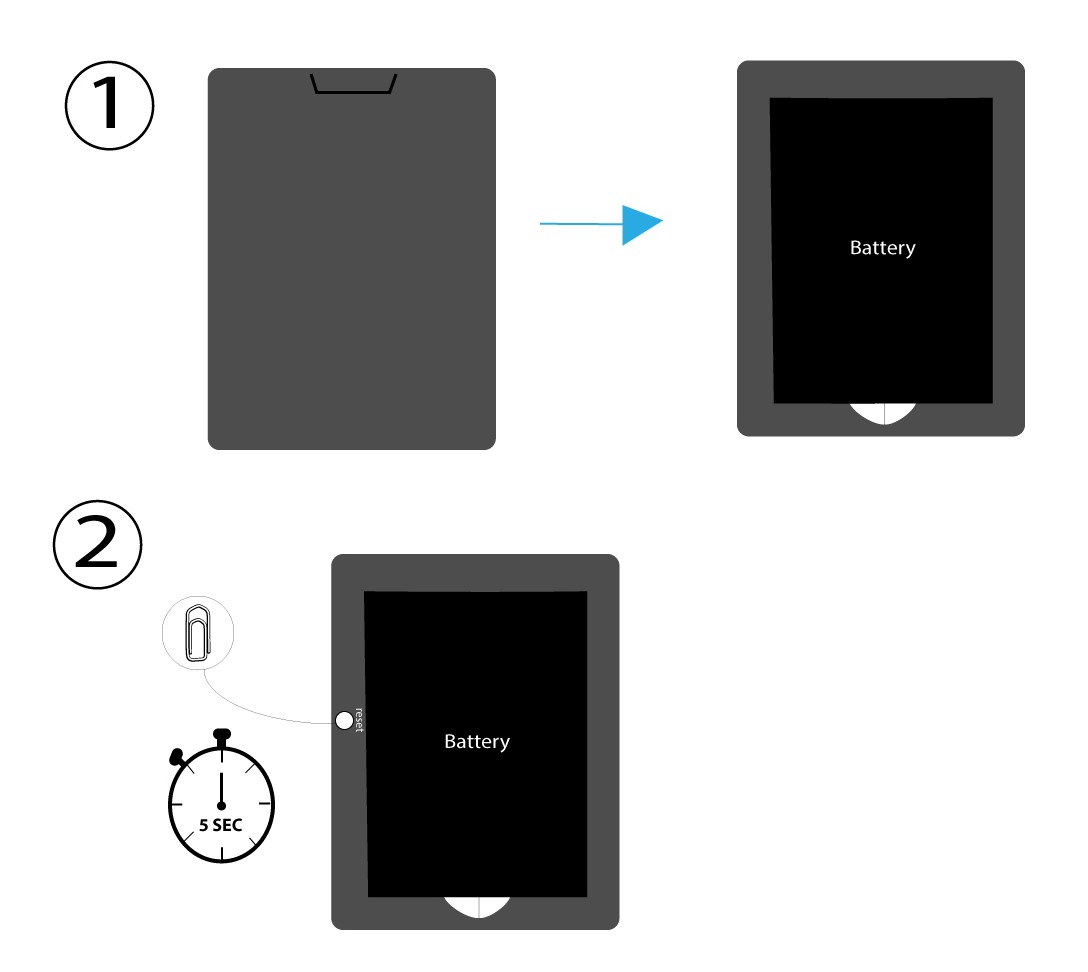
CASE 1: Reset button
To do so, remove the cover on the rear side of the router and press the RESET Button for 5 seconds with a paper clip.

 English
 Български(Bulgarian)
 Hrvatski(Croatian)
 Čeština(Czech)
 Dansk(Danish)
 Nederlands(Dutch)
 Suomi(Finnish)
 Français(French)
 Deutsch(German)
 Magyar(Hungarian)
 Italiano(Italian)
 Norsk bokmål(Norwegian Bokmål)
 Polski(Polish)
 Português(Portuguese (Portugal))
 Română(Romanian)
 српски(Serbian)
 Slovenčina(Slovak)
 Slovenščina(Slovenian)
 Español(Spanish)
 Svenska(Swedish)
 Українська(Ukrainian)
 United Kingdom
CASE 1: Reset button
To do so, remove the cover on the rear side of the router and press the RESET Button for 5 seconds with a paper clip.